
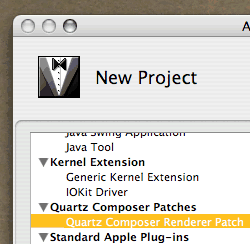
New Custom Quartz Composer Patch Xcode Template

Create a new Xcode project with this templateHere’s a new version of the Xcode Template for Custom Quartz Composer Patches.

Changes:

  • Rebuilt from scratch — no longer depends on QCJP’s work — and, by extension, the Creative Commons “Attribution-NonCommercial-ShareAlike” license. My Xcode Template, as of version 0.2, is released into the Public Domain. You are free to use it for whatever — commercial or non-commercial.
  • QCJP’s headers were replaced with headers assembled directly from the QuartzComposer framework — now located in the QuartzComposer/ folder of the project. I’ve exported a few more headers than QCJP had constructed, so there’s some added functionality (namely, image input/output ports).
  • The project now automatically assigns an icon to the patch bundle, and installs it in /Library/Graphics/Patches/ for you each time you build, for faster edit-build-test workflow.
This release is out-of-date.
Please see the latest version.

Download the installer, version 0.2.

See the old version’s blogpost for some additional instructions and user comments.

Just the auto-move to /Library/Graphics/Patches alone is a show stopper. build/test cycles have never been faster :) Good Work.

Great works ! I’ve been struggling with Structure port on your old template, but am delighted to see QCStructure is presented in your new template.

I have developer tools on my HD but the 0.2 installer says it isn’t. I am running the Leopard dev tools version.

James -

We’ve published a few newer versions of the QC Patch Xcode Template (now with Leopard compatibility) on kineme.net — http://kineme.net/XcodeTemplateForCustomQuartzComposerPatches

Steve

Post new comment

  • Web page addresses and e-mail addresses turn into links automatically.
  • Allowed HTML tags: <a> <em> <strong> <cite> <code> <ul> <ol> <li> <dl> <dt> <dd> <img> <blockquote> <pre> <div> <span> <b> <i> <br> <table> <tr> <td> <th>
  • You can enable syntax highlighting of source code with the following tags: <code>, <blockcode>, <c>, <cpp>, <drupal5>, <drupal6>, <java>, <javascript>, <php>, <python>, <ruby>. Beside the tag style "<foo>" it is also possible to use "[foo]".
  • You may insert videos with [video:URL]
  • You can use Markdown syntax to format and style the text. Also see Markdown Extra for tables, footnotes, and more.
  • Adds typographic refinements.

More information about formatting options