
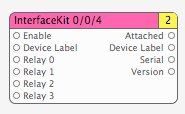
I made a pair of patches to allow Quartz Composer to directly interact with the Phidget InterfaceKit 0/0/4 (relay outputs) and 8/8/8 (digital inputs + analog inputs + digital outputs).
This release is only compatible with Tiger (10.4).Please see kineme.net for Leopard-compatible patches.
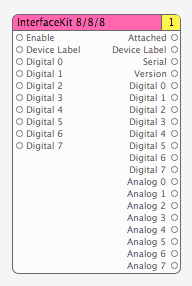
Notes:
- These require the Phidget21 drivers to be installed.
- Device Labels are specified using POSIX Regular Expressions.
- Due to a bug in the Phidget21 driver, I can’t manually fetch a list of interfaces, and so need to rely on notifications.. So if you change the Device Label regex, you’ll need to unplug-and-replug the Phidget for it to be recognized.
- Both patches are pink “Renderer” patches because they provide output from Quartz Composer — they are “sinks” in graph theory. Given QC’s graph evaluation model, I haven’t yet found a way to make these patches reliably output data unless they’re (improperly) marked as “Renderer”s.
- Both patches should support multiple InterfaceKits of the same or differing types — as long as you specify non-overlapping Device Labels for each. I haven’t been able to test this yet — my second InterfaceKit 8/8/8 should arrive later this week.
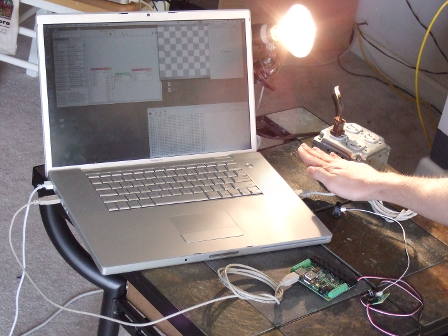
Here’s a little test setup, using a distance sensor connected to one of the InterfaceKit 8/8/8’s analog inputs, which — via Quartz Composer — controls a relay output on the InterfaceKit 0/0/4. Beth and Robert built the 0/0/4 into a box of 120VAC receptacles, into which I’ve plugged a light.
Far from distance sensor = Relay off
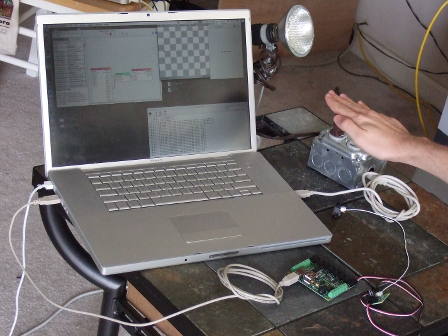
Close to distance sensor = Relay on
Piece of cake.
Update — my second InterfaceKit 8/8/8 is here, and both InterfaceKit 8/8/8s are working simultaneously with this patch.
By smokris on 05.19.07 16:34 | Permalink
are these compiled for ppc or intel or both? Can’t see them on my QC :(
from console:
2007-05-25 15:22:56.179 Quartz Composer[3301] *** -[NSBundle load]: Error loading code /Library/Graphics/Patches/PhidgetPatches.plugin/Contents/MacOS/PhidgetPatches for bundle /Library/Graphics/Patches/PhidgetPatches.plugin, error code 2 (link edit error code 0, error number 0 ())
2007-05-25 15:22:56.179 Quartz Composer[3301] *** : Could not load principal class from bundle at path “/Library/Graphics/Patches/PhidgetPatches.plugin”
2007-05-25 15:22:56.187 Quartz Composer[3301] In qcplugins PatchLoader
By tomtom on 05.25.07 07:26 | Permalink
I can’t get your new patches to work. They don’t even show up in the patch library. I get this error message in console when I launch QC:
2007-05-25 15:16:58.540 Quartz Composer[340] *** -[NSBundle load]: Error loading code /Library/Graphics/Patches/PhidgetPatches.plugin/Contents/MacOS/PhidgetPatches for bundle /Library/Graphics/Patches/PhidgetPatches.plugin, error code 2 (link edit error code 0, error number 0 ())
2007-05-25 15:16:58.540 Quartz Composer[340] *** : Could not load principal class from bundle at path “/Library/Graphics/Patches/PhidgetPatches.plugin”
2007-05-25 15:16:58.651 Quartz Composer[340] In qcplugins PatchLoader
I’m using an iBook G4.
By matti on 05.25.07 07:34 | Permalink
matti / tomtom -
It looks like this is a Universal Binary issue — currently all of my development workstations are i386-based.. so I have compiled the patches with only i386 support.
I’ll try to track down a G4-based machine with OS X 10.4.9, to recompile and test the patches there, and will post here when I’ve got them working.
Steve
By smokris on 05.25.07 20:51 | Permalink
update: doesn’t work on an 2 GHz intel Core Duo iMac with 10.4.8.
This time I get an error when launching QC:
> Macro Patch
Cannot create node of class “PhidgetInterfaceKit888Patch” and identifier “(null)”
> Macro Patch
Cannot create connection from [”outputAttached” @ “PhidgetInterfaceKit888Patch_1″] to [”Visible” @ “Patch_9″]
> Macro Patch
Cannot create connection from [”outputVersion” @ “PhidgetInterfaceKit888Patch_1″] to [”Visible” @ “Patch_12″]
> Macro Patch
Cannot create connection from [”outputAnalog1″ @ “PhidgetInterfaceKit888Patch_1″] to [”a_proxy_1″ @ “Patch_2″]
> Macro Patch
Cannot create connection from [”outputDeviceLabel” @ “PhidgetInterfaceKit888Patch_1″] to [”String” @ “Patch_10″]
> Macro Patch
Cannot create connection from [”outputAnalog2″ @ “PhidgetInterfaceKit888Patch_1″] to [”a_proxy_1″ @ “Patch_3″]
> Macro Patch
Cannot create connection from [”outputAnalog3″ @ “PhidgetInterfaceKit888Patch_1″] to [”a_proxy_1″ @ “Patch_4″]
> Macro Patch
Cannot create connection from [”outputSerial” @ “PhidgetInterfaceKit888Patch_1″] to [”String” @ “Patch_11″]
> Macro Patch
Cannot create connection from [”outputAnalog4″ @ “PhidgetInterfaceKit888Patch_1″] to [”a_proxy_1″ @ “Patch_5″]
> Macro Patch
Cannot create connection from [”outputAnalog5″ @ “PhidgetInterfaceKit888Patch_1″] to [”a_proxy_1″ @ “Patch_6″]
> Macro Patch
Cannot create connection from [”outputVersion” @ “PhidgetInterfaceKit888Patch_1″] to [”String” @ “Patch_12″]
> Macro Patch
Cannot create connection from [”outputAnalog6″ @ “PhidgetInterfaceKit888Patch_1″] to [”a_proxy_1″ @ “Patch_7″]
> Macro Patch
Cannot create connection from [”outputSerial” @ “PhidgetInterfaceKit888Patch_1″] to [”Visible” @ “Patch_11″]
> Macro Patch
Cannot create connection from [”outputAnalog7″ @ “PhidgetInterfaceKit888Patch_1″] to [”a_proxy_1″ @ “Patch_8″]
> Macro Patch
Cannot create connection from [”outputAnalog0″ @ “PhidgetInterfaceKit888Patch_1″] to [”a_proxy_1″ @ “Patch_1″]
> (null)
State restoration failed on
I don’t have the admin rights to this computer so it required some hacking to install in the correct folder (Basically copying them to the correct place in FireWire disk mode) and so I also can’t install 10.4.9 if that is the issue…
I’ve gotten the older Kineme plugins to work in this machine though,
By tomtom on 05.29.07 09:37 | Permalink
Any chance of getting the source for these? I’d like to try this with other devices / with Leopard.
E-mail me please.
Thanks,
-Patrick
By Patrick McNeil on 11.02.07 13:58 | Permalink
Were these ever updated or released for Leopard?
By Alessandro Sabatelli on 04.25.08 17:49 | Permalink
Alessandro and Patrick -
We haven’t yet ported them to Leopard, but we’re planning on it soon (including source).
Thanks,
Steve
By smokris on 04.25.08 22:12 | Permalink
Thanks Steve.
By Alessandro Sabatelli on 05.05.08 16:43 | Permalink
I changed computer and the phidgets work! However, I would be interested to see QC working with Phidget servo motors as well - shouldn’t be too hard to implement, perhaps just a paragraph or a few of code. source?
By tomtom on 05.08.08 10:10 | Permalink
Any word on the port to Leopard? Very interested! And thanks for getting us this far!
By Jim Nevin on 06.14.08 14:49 | Permalink
Hello, quick q. I’m getting the same the same error that tomtom got but when I load the 888 demo and sumot similar for tother. 2.2GHz Intel core 2. 2GB Ram - Tiger. What was different about the computer that you changed to tomtom? Also if it has been made for leopard on the kineme site as I can’t see it and there’s a link up top of page?
thankyou
By Christoph on 07.03.08 06:39 | Permalink