
This is the second release of the Kineme Quartz Composer Plugins.
New this time:
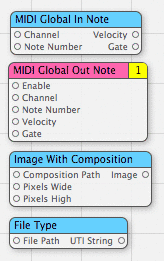
- MIDI Global In Note :: This patch observes a specified MIDI Note number on a specified MIDI Channel, and outputs the Velocity and a boolean Gate signal.
- MIDI Global Out Note :: This patch, when Gate is rising true, outputs a MIDI note-on message on a specified MIDI Channel with the specified Velocity. When Gate is falling false, a MIDI note-off message is sent.
- Image With Composition :: This patch loads a Quartz Composer Composition (.qtz) file and renders it to an Image. (This is intended to replace functionality that was removed with the Mac OS X 10.4.7 update, as described by Roger Bolton and David Wolf.)
- File Type :: This patch provides the Uniform Type Identifier (UTI) of the specified file. For example, if the path to a QuickTime movie is specified, File Type outputs “com.apple.quicktime-movie”.
This release is only compatible with Tiger (10.4).Please see kineme.net for Leopard-compatible patches.
Get them here: http://softpixel.com/~smokris/widgets/quartzComposer/kinemePlugins/
many thanks for these - very exciting; shame the development has to feel so cloak and dagger!
By steamshift on 09.22.06 08:09 | Permalink
[…] FDIV has managed to reproduce the functionality that Apple removed in version 10.4.7 of Mac OS X by creating an “Image with Composition” loader patch. Also, FDIV has coded three other patches, MIDI Global IN Note, MIDI Global OUT Note and File Type. Massive thanks to FDIV for making these freely available from his page […]
By Quartonian: live performance with Quartz Composer » Blog Archive » FDIV Composition Loader + more new patches…. on 09.22.06 18:18 | Permalink
Thanks heaps for these!
Just trying them out now I found a weird issue with the “Image With Composition” patch. It seems to render everything out with red at 100%. Any ideas?
Also it would be excellent if you could add the capacity for an external timebase next version. Thanks again.
Cheers
Dave
By dpwolf on 09.22.06 21:42 | Permalink
Dave -
Right on. Image With Composition should have the Timebase option and it should be “Green”, too. I just found the Timebase flag, and will post these fixes in the next release.
As for the redness… Could you email me the output of System Profiler? I’ll investigate.
- smokris
By smokris on 09.23.06 00:01 | Permalink
Hi there,
Thanks for posting the Image With Composition patch…I get the redness problem too on my iBook G4, 10.4.7.
By maneesh on 09.27.06 16:47 | Permalink
Great Stuff!!!!
QC now has everything I always wanted save one more thing - a way to communicate with other applications.
Would it be possible to create a patch that can call a shell script?
With this simple patch, we can even call Applescript thru the osascript utility.
Pretty please, with sugar on top?
I’d do it myself if I knew how to :(
By Javester on 10.30.06 18:10 | Permalink
Just curious if someone could provide an example of how to use a track playing in iTunes to interact with QC. An example would be to have a dynamic spectrogram of the active song’s input.
I’ve played with it and can’t seem to get it to work.
Thanks to anyone that might have input.
By kaustic on 11.11.06 10:29 | Permalink
it would be really great if it was possible to implement OSC communication in QC, since this communication protocol is available for a lot of applications, like flash, max/msp, pd etc.
By hc gilje on 12.06.06 14:25 | Permalink
Thanks for these tools — I can’t wait to try them out as I think they’ll be a lifesaver on my first-ever QC project. BUT… I can’t for the life of me figure out where to put plugins folder once its been downloaded. Can you please help this newbie?? I’ve followed the instructions, but I don’t seem to have a /Library/Graphics/Patches folder anywhere on my system. Help!
By ianding on 05.05.07 17:37 | Permalink
ianding -
No problem. You can actually just create that folder if it doesn’t exist. In Finder, press apple-shift-G, and enter “/Library”. Try to find “Graphics” — it should probably already be there, but create it if it’s not already there. Create “Plugins” within the “Graphics” folder.
Feel free to email me if you have further questions.
Steve
By smokris on 05.05.07 23:36 | Permalink
[…] Kineme Plugins […]
By NEON GOLDEN » Blog Archive » Max/MSP Sound Analysis for Quartz Composer via MIDI on 05.14.07 15:13 | Permalink
Smokris,
Where can i retreive the Midi note out info?
Is QC supposed to make itself available with midi out channels?
Also, thanks for “Accumulate”. A frame blender to go, for slowmo video would be nice. GridPro had it working beautifully. Any Ideas?
boya
By Boya Bøckman on 05.29.07 06:05 | Permalink
There is an issue in Quartz Composer when passing a NSImage, that can cause its color profile information to be lost, producing a slight hue shift in the image’s pixels. This is especially visible when passing / retrieving an image as an NSImage several times to / from Quartz Composer. As a consequence, NSImages should not be used to pass images to Quartz Composer when color fidelity matters (use CGImageRef instead).
By ewan on 06.14.07 13:43 | Permalink
Those new patches are amazing. Well done and Thanks.
Sorry if this seems like a stupid question, but, I’m working on my first quartz project and I wonder if anyone can tell me if there is any workaround for controlling quartz with Java? I’m looking at your file path patch. Could that do it?
jagal
By jagal on 06.28.07 12:12 | Permalink
A Mac Newbie, the “Image with Composition” looks just the ticket for letting me use QC for cleaning up some scanned old photos.
I am running OSX V10.5.1 and copied the Kineme.plugin into the “~/Library/Graphics/Quartz Composer Plug-Ins” directory as suggested in the “Quartz Composer Custom Patch Programming Guide”.
QC finds the plugin but Console reports:
30/12/07 10:54:13 AM Quartz Composer[554] *** QCPlugIn: Bundle at path “/Users/colin/Library/Graphics/Quartz Composer Plug-Ins/Kineme.plugin” is not a valid Quartz Composer plug-in
Any thoughts would be greatly appreciated.
Colin
By Colin on 12.29.07 17:39 | Permalink
Colin -
Thanks for your feedback. This plugin (Kineme.plugin) is meant to run on Tiger (Mac OS 10.4) only.
On Leopard (10.5), there is now a built-in patch called “Composition Loader” which does roughly the same thing as my “Image with Composition” patch.
See also kineme.net for some new (Leopard-compatible) patches.
- smokris
By smokris on 12.30.07 00:33 | Permalink
[…] Document Info :: This patch returns some information about the zeroth Cocoa NSDocument. This release is out-of-date.Please see the latest version. […]
By fdiv.net » Some New Quartz Composer Patches on 12.30.07 00:48 | Permalink