Private Patch Settings

Some further string-hunting in the Quartz Composer framework has revealed an interesting value:

QCShowPrivatePatchSettings

It looks like Quartz Composer is reading a value with this key from the global user defaults repository.

In fact, enabling it by bringing up Terminal and typing

defaults write -g QCShowPrivatePatchSettings 1

causes Quartz Composer to present some additional options for well-known patches.

This release is only compatible with Tiger (10.4).
Please see kineme.net for Leopard-specific informations.

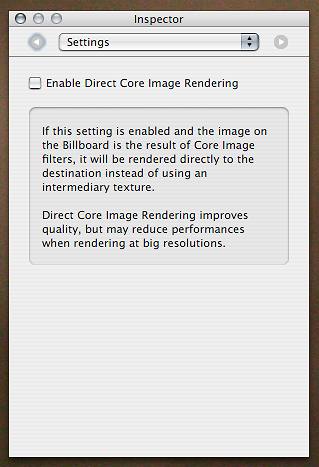
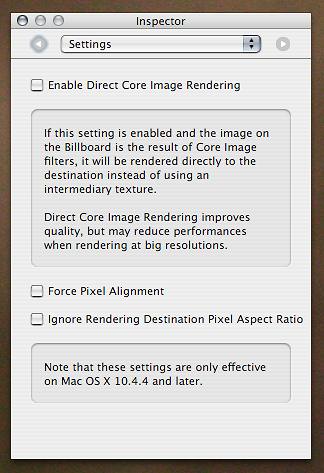
Billboard” now includes “Force Pixel Alignment” and “Ignore Rendering Destination Pixel Aspect Ratio“ checkboxes:

BeforeAfter

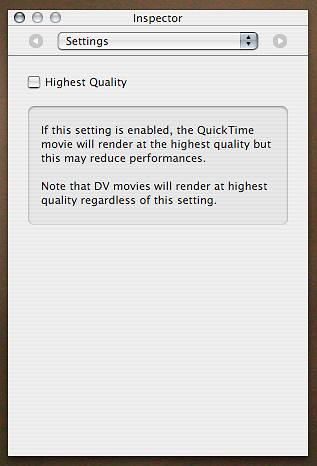
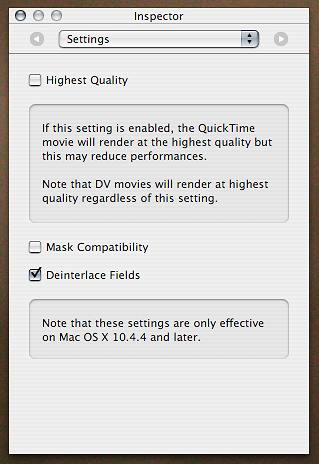
And “Image With Movie” now includes “Mask Compatibility” and “Deinterlace Fields“ checkboxes:

BeforeAfter

Oooh more hidden stuff, any idea what any of it does!?

steamshift -

I haven’t spent a lot of time playing with it yet, but so far the only change I’ve observed is that the “Mask Compatibility” makes the Movie black-and-white. The ability to disable Deinterlacing looks particularly exciting but I don’t have any interlaced video around to test at the moment.

  • smokris

Post new comment

  • Web page addresses and e-mail addresses turn into links automatically.
  • Allowed HTML tags: <a> <em> <strong> <cite> <code> <ul> <ol> <li> <dl> <dt> <dd> <img> <blockquote> <pre> <div> <span> <b> <i> <br> <table> <tr> <td> <th>
  • You can enable syntax highlighting of source code with the following tags: <code>, <blockcode>, <c>, <cpp>, <drupal5>, <drupal6>, <java>, <javascript>, <php>, <python>, <ruby>. Beside the tag style "<foo>" it is also possible to use "[foo]".
  • You may insert videos with [video:URL]
  • You can use Markdown syntax to format and style the text. Also see Markdown Extra for tables, footnotes, and more.
  • Adds typographic refinements.

More information about formatting options