
How to make Pop-Up Menus in Custom Quartz Composer Patches

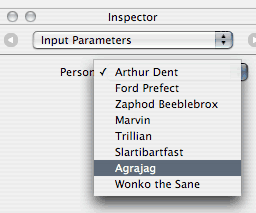
screenshot of a custom Quartz Composer patch's pop-up menuMaking pop-up menus in custom Quartz Composer patches is actually surprisingly easy.

This release is only compatible with Tiger (10.4).
Please see kineme.net for Leopard-specific informations.
  1. Set up a QCIndexPort input. QCIndexPorts provide values from 0 to whatever max you specify using - (void)setMaxIndexValue:(unsigned int)max;.

@interface IndexPortPopUpDemoPatch : QCPatch
{
    QCIndexPort *inputPerson; }

...

@end

  1. Add the “menu” key to the port’s input attributes:

    <key>inputAttributes</key>
    <dict>
        <key>inputPerson</key>
        <dict>
            <key>description</key>
            <string>Person</string>
            <key>name</key>
            <string>Person</string>
            <key>menu</key>
            <array>
                <string>Arthur Dent</string>
                <string>Ford Prefect</string>
                <string>Zaphod Beeblebrox</string>
                <string>Marvin</string>
                <string>Trillian</string>
                <string>Slartibartfast</string>
                <string>Agrajag</string>
                <string>Wonko the Sane</string>
            </array>
        </dict>
    </dict>
    

  2. Make sure you set the max index value in the initWithIdentifier function:

    • (id)initWithIdentifier:(id)fp8 { id z=[super initWithIdentifier:fp8];

      [inputPerson setMaxIndexValue:7];

      return z; }

  3. Read the value out of the QCIndexPort using - (unsigned int)indexValue;.

can you make and post a screen shot of it working within Quartz Composer itself? Holy cow I’m so excited to give this a shot this weekend :)

cwright -

The screenshot in the top right corner is actually QC itself.

smokris

Ahh, right you are. I wasn’t familiar with the Inspector window in QC :) I thought that was the Interface Builder’s Inspector guy. My Bad :)

To generate menu items at runtime, you have to override QCIndexPort’s initWithNode method. it looks like this:

  • (id)initWithNode:(id)fp8 arguments:(id)fp12;

Here’s some code to do just that:

  • (id)initWithNode:(id)fp8 arguments:(id)fp12 { NSMutableDictionary *config = [fp12 mutableCopy]; NSMutableDictionary *attr; NSMutableArray *menu = [[NSMutableArray alloc] init];

    [config autorelease]; [menu autorelease];

    attr = [config objectForKey:@”attributes”];

    [menu addObject:@”foo”]; [menu addObject:@”bar”]; [menu addObject:@”baz”];

    [attr setValue:menu forKey:@”menu”];

    return [super initWithNode:fp8 arguments:config]; }

Post new comment

  • Web page addresses and e-mail addresses turn into links automatically.
  • Allowed HTML tags: <a> <em> <strong> <cite> <code> <ul> <ol> <li> <dl> <dt> <dd> <img> <blockquote> <pre> <div> <span> <b> <i> <br> <table> <tr> <td> <th>
  • You can enable syntax highlighting of source code with the following tags: <code>, <blockcode>, <c>, <cpp>, <drupal5>, <drupal6>, <java>, <javascript>, <php>, <python>, <ruby>. Beside the tag style "<foo>" it is also possible to use "[foo]".
  • You may insert videos with [video:URL]
  • You can use Markdown syntax to format and style the text. Also see Markdown Extra for tables, footnotes, and more.
  • Adds typographic refinements.

More information about formatting options