
fdiv> the floating-point divide <
61 Hidden Patches


And a second entry in the exciting-discoveries-late-last-night file:

QCRegisterPrivatePatches

Enables dozens of new CoreImage kernels, the previously-described hidden patches, and a few as-of-yet-unseen patches.

Turn it on by bringing up Terminal and typing:

defaults write -g QCRegisterPrivatePatches 1

This release is only compatible with Tiger (10.4).
Please see kineme.net for Leopard-specific informations.

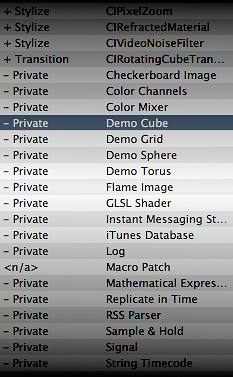
Lo, free of additional charge and import tariffs, one sees:

Checkerboard Image
Color Channels
Color Mixer
Demo Cube
Demo Grid
Demo Sphere
Demo Torus
Flame Image
GLSL Shader
Instant Messaging Status
iTunes Database
Log
Mathematical Expression
Replicate in Time
RSS Parser
Sample & Hold
Signal
String Timecode

and lots of CoreImage kernels:

+ Blur                  CIBilateralFilter
+ Blur                  CICheapBlur
+ Blur                  CIGaussianPyramid
+ Color Adjustment      CIDesaturateGamutMapping
+ Color Adjustment      CIGamutAlarm
+ Color Adjustment      CIGamutClamp
+ Color Adjustment      CIGamutRollOff
+ Color Adjustment      CILuminanceGamutMapping
+ Color Adjustment      CIWhitePoint
+ Color Adjustment      CIOpacity
+ Composite Operation   Add Blend Mode
+ Composite Operation   Alpha Add Blend Mode
+ Composite Operation   Behind Blend Mode
+ Composite Operation   CIMixOver
+ Composite Operation   Hard Mix Blend Mode
+ Composite Operation   Linear Burn Blend Mode
+ Composite Operation   Linear Dodge Blend Mode
+ Composite Operation   Linear Light Blend Mode
+ Composite Operation   Luminescent Permultiply Blend Mode
+ Composite Operation   PinLight Blend Mode
+ Composite Operation   Silhouette Alpha Blend Mode
+ Composite Operation   Silhouette Luma Blend Mode
+ Composite Operation   Stencil Alpha Blend Mode
+ Composite Operation   Stencil Luma Blend Mode
+ Composite Operation   Subtract Blend Mode
+ Composite Operation   Vivid Light Blend Mode
+ Distortion Effect     CIShapedWaterRipple
+ Generator             CIColorWheelGenerator
+ Generator             CIRectangleGenerator
+ Generator             CISumOf8Conics
+ Sharpen               CIRAWSharpen
+ Stylize               CIBayerReconstruction
+ Stylize               CIBayerReconstructionV0
+ Stylize               CIDeBayer
+ Stylize               CIDistanceFieldFromMask
+ Stylize               CIEmboss
+ Stylize               CIHeightFieldFromConstraints
+ Stylize               CILanczosBayerReconstruction
+ Stylize               CIPixelZoom
+ Stylize               CIRefractedMaterial
+ Stylize               CIVideoNoiseFilter
+ Transition            CIRotatingCubeTransition

Woah.

Great work here! None of the ’stylize’ filters seem to work, and the IM status still crashes QC for me. I like the Pin Light Blend Mode, though, and the Color Wheel Generator is quite nice as well.

Momo -

Sweet! The ’stylize’ filters all seem to work for me — I just tested them — though I’m not really sure how to use all of them. Google and Apple Developer Documentation don’t return anything useful for those I’ve searched, either.

I put together a quick demo successfully using CIRefractedMaterial, CIPixelZoom, and CICheapBlur — check out http://softpixel.com/~smokris/widgets/quartzComposer/RippleDissolve.qtz

- smokris

[…] FDIV has recently revealed that just typing “defaults write -g QCRegisterPrivatePatches 1″ and “defaults write -g QCShowPrivatePatchSettings 1″ in the terminal you can enable 61 new private patches in QC and some extra settings in the Billboard and “Image with Movie” patches. I went hunting around and found some other settings inside the Quartz Composer applications resources. […]

Yay… more stuff to play with - many thanks!!

I bet that these extra CI filters are ones that Aperture uses…

eg “CIBayerReconstruction”….’CIRawSharpen”… these are all CI filters that have been written for Aperture to be used in the Demosaicking and RAW->RGB conversion….

guess all systems ship with those ci filters installed even if Aperture is not installed…

[…] See http://fdiv.net/2006/09/19/61-hidden-patches/ For the download here, I have replaced the ‘CICheapBlur’ patch with a gaussian blur - so there shouldn’t be errors if you do not have the ‘hidden’ patches activated. This effects performance slightly. With custom core image filters appearing in the QC patches pane, I am sure it is quite possible to distribute compositions that will not run on other people’s machines without the custom CI filter. There seem to be more useful custom patches appearing on the scene with a number of excellent ones from Boinx. I hope a useful installation mechanism can be constructed to distribute the pre-requiste elements for custom patches. […]

[…] To install it, you need a Mac computer, and you need to save the file to Library/Screen Savers/ folder. Then select it from System Preferences and set the options, e.g., flickr feed URL. The Quartz composition has one of the hidden patches, RSS Parser, which allows to access to the contents of the feed bypassing the Safari processing, i.e., I get the actual content of the description item. The RSS parser does not cope well with third level structures, so I could not retrieve the value of the URL tag inside the “media” structure. […]

does someone know if it would be possible to make a videoplaylist with the “iTunes Database”-patch?
Or is it only for musik?
I need something like a simple videoserver that plays all videos in one folder - one after the other.

k.

Hi, has anyone found out how to use the debayer filters? I can’t get them to work.

Mark

help meeeeeee, i’ve written in the terminal “defaults write -g QCRegisterPrivatePatches 1″ and “defaults write -g QCShowPrivatePatchSettings 1″ but no new patchs appear :-(

c -

This blog post applies only to Tiger. In Leopard, you need a slightly different command — check out http://kineme.net/Discussion/Leopard/PrivatePatchesLeopard .

- smokris

   TrackBack


(required)
(required)